The Challenge:
…to implement a PC-based motion control system suitable for use with scenic
effects in live theatrical performance. The system must be compatible with the
time and budget constraints common to the not-for-profit world of the arts and
still offer a flexible cue-based structure familiar to theatre
practitioners.
The Solution:
Flexmotion controllers, which offer a cost effective and straightforward
way to control multiple servo axes, are an excellent fit with cable drum
winches (typical of the motorized machines used for theatre scenery) as they
generally use drives that accept standard +/-10 vdc control signals. Using
LabVIEW and the VIs that are that are part of the Flexmotion software
libraries allows for rapid development of the front-end HMI stagehands use to
operate scenic effects in performance.
Abstract
Leveraging technology from the realm of industrial automation for
application to stage effects in live theatrical performance has proven to be a
successful strategy in negotiating the demanding time and funding constraints
common to artistic endeavor. This paper details an HMI developed under LabVIEW
and utilizing National Instruments Flexmotion hardware that successfully
controls the motion of nine axes of motorized scenery in a complex
dance-performance piece titled Automated Body. Each scenic piece moves by a
winch-mounted AC motor with a vector drive configured as a servo axis under
command of the Flexmotion controllers. Development under LabVIEW allows quick
tailoring of the HMI to the specific configuration needed for this
performance—specifically, rapid access to a stored set of motion parameter
“cues” where any combination of motors might be called upon to operate singly
or in coordination in various combinations throughout the performance.
The Automated Body Project
In the performing arts--specifically dance, opera, and theatre--creative
personnel routinely collaborate with their technical colleagues in the
development of the physical environment constructed and experienced on the
stage. In this instance, choreographer Yacov Sharir and scenic designer
Richard Isackes envisioned a dynamic, translucent 3-dimensional projection
surface as a primary scenic element for an original dance-theatre piece titled
Automated Body to be performed at the University of Texas at Austin. The
technical challenge, to motorize and automated the component pieces of this
stage sculpture, was undertaken by the Professor Fritz Schwentker with the
assistance of graduate students in UT’s Department of Theatre and Dance.
The scenic effect in question consists of a series of fine clear-acrylic
beaded curtains suspended from 3-foot x 3-foot frames [see Figure 1 below].
|
Figure 1: The "Box" with dancers in performance. |
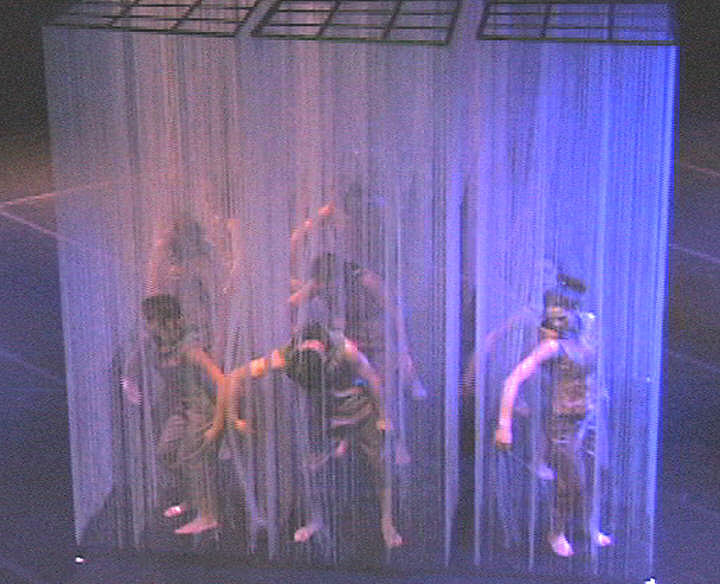 |
Nine of these curtain frames arranged in a 3 x 3 array comprise a box nine
feet on a side and ten feet tall. The clear-acrylic bead chain serves not only
as a curtain, but as a projection surface for the lighting effects, video, and
computer generated graphics seen throughout the production. Since the bead
chain that makes up the curtains hangs on one-inch centers, it is permeable in
a manner that allows performers to move inside the projection surface. But,
the creative team for the Automated Body Project needed the suspended pieces
to move vertically within the performance space at various times throughout
the piece--sometimes simply to fly the box clear of the stage floor itself,
but more often to arrange the component parts of the box’s array dynamically
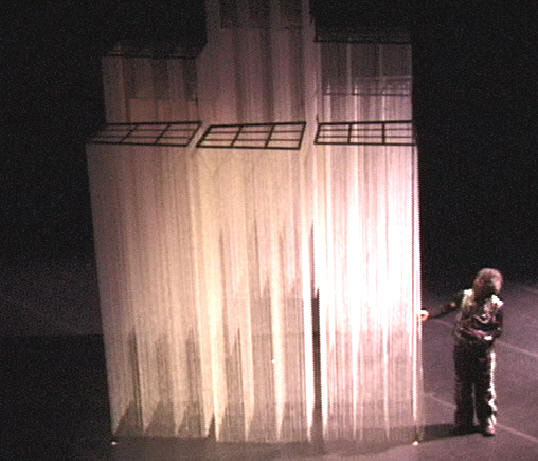
as part of the choreography. The ability to control the motion of each section
in terms of both speed and position proved crucial to offering the variety of
arrangements the choreographer and designer might want on stage as in Figure
2.
| Figure 2: The "box" moves to assume various shapes. |
 |
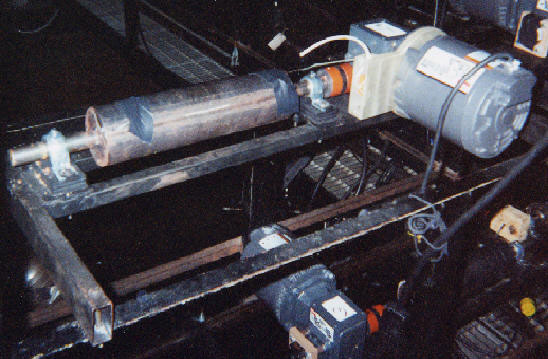
With the above in mind, the mechanical design called for nine cable-drum
winches to move individual curtain-frames [Figure 3]. A modest budget for
equipment dictated that each of these mount an AC three-phase induction motor
fed by a variable frequency vector drive. The control for these nine
drive/winch units needed to allow for the broadest possible range of speed and
position combinations. Even more crucially, the control had to allow those
combinations to be stored easily during the technical rehearsal process so
that they could be replayed accurately during performances. The operator
interface had to allow accurate visual feedback of the motion and position as
many moves happen in darkness or in views obscure to the stagehand/operator.
Finally, the interface had to be safe and simple to use—because, as is typical
in live performance, there is little time for operator training, and the
technical rehearsal period in which all lighting, audio, automation, and
choreography are brought together with the performers is compressed, hectic,
and often exhausting for all participants.
| Figure 3: Typical cable winch. |
 |
The control system for the Automated Body uses two Flexmotion cards (one
four-axis and one six-axis version) and their associated wiring interfaces to
serve the nine vector drive axes. In order to offer excellent speed control
and synchronization, the Flexmotion controllers and vector drives are treated
as servo systems in this application with position feedback supplied by
shaft-mounted incremental encoders on the winch frames. Flexmotion VIs provide
convenient access to motion parameters needed by the controllers; these are
called by an HMI built and running under LabVIEW on a standard desktop PC.
Evolving a Cue-Sheet
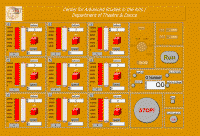
The operator interface for the Automated Body project as seen in Figure 4
performs three major functions—it
1) provides an input method for trajectory data
2) offers visual feedback on axis positions, and
3) gives access to the cue-sheet.
In fact it is the requirements of this last component that drives the
structure of the entire process. Using the paradigm of a cue and cue sheets
familiar to theatre practitioners
for generations, any motion cue is comprised of the following essential data
for each axis: whether the axis is selected to run, target position, top
speed, acceleration, and deceleration.
To LabVIEW, the motion data for each axis is a cluster of the five
essential components noted above, and a cue is an array of clusters, its size
determined by the number of axes available or needed for the performance in
question. A cue-sheet then is an array of cue arrays, the size of which is
also user determinable. The operator can call up a blank cue-sheet or one
previously saved to disk; as long as a cue-sheet is loaded, the cues can be read
or saved during technical rehearsals or performances at any time as required
through calls to sub-VIs. While the interface is running, these sub-VIs access
global variables holding the currently active cue, the cue-sheet, and flags
noting whether a cue has been changed or saved. In this project, LabVIEW’s
cluster and array tools made possible the development of simple methods to
update motion data in the axis clusters globally (e.g. speed, acceleration,
deceleration.) rather than the operator setting each parameter individually.
| Figure 4: Front panel interface for the Automated Body controller. In
addition to setting position and speed for each axis the operator can enable
the axes for each cue. |
 |
Choosing the Control
A theatrical motion control system should offer similar capabilities to the
lighting consoles that have served live theatrical performance for almost 30
years--at a minimum, the ability to save and replay cues at the touch of a
button. Certainly, the automation of scenery has progressed markedly in
high-end commercial venues like Broadway and Las Vegas, but unlike the stage
lighting industry, no significant commercial market has developed to serve the
control needs for stage machinery. With few exceptions, technical personnel in
theatres looking to work beyond simple (e.g. limit switch and speed
potentiometer) control of motorized effects must choose from the components
available to the world of industrial automation rather. PLCs are in fairly
widespread use as position control devices, but have often proven inflexible
to program in the short installation and technical rehearsal periods typical
to the business. On the other hand motion control cards like National
Instruments’ Flexmotion controllers and others offer vast amounts of
sophisticated capabilities and generally easy interface with motor drives and
feedback devices. Further, they are cost effective for many theatre operations
since four or six axes of motion are easily priced at less than the single
axis analogue devices produced by one of the few vendors of theatre-specific
motion controllers.
Conclusion
For this project, the specific choice of a Flexmotion controller (over
other manufacturer’s models tested in theatrical projects preceding this one)
is the seamless integration with LabVIEW. The programming environment had
already proven itself useful in previous theatre automation projects since it
allows HMIs to be tailored to a production’s needs in the shortest possible
time. Since the typical time devoted to such development can be as short as a
week, and even with LabVIEW it can still be frustrating to integrate object
libraries not written specifically for that environment. But, this first full
scale use of the Flexmotion series demonstrates the value of having well
documented and tested VIs in place that are fully integrated with the
development environment.
|
